Built by a working cattle & sheep farmer · founding cohort now open

Your forward cashflow, and where your farm sits this year.

Build the plan from your MYOB, Xero or CSV accounts, or from scratch with no accounts. See the month the bank gets tight, and where the business and each enterprise sits this year.

Live benchmarking on every plan: this year's full-year forecast, updated each month, against farms in your region, or across your state where your region has no like-for-like figure. Not after the year ends.

Your data, your plan — private to your account. No spreadsheets, no consultant fees.
Operating result
forecast live
TheFarmOS · Forward Plan
Next 12 months, by enterpriseCashProfit
Cattle breeding+$146k
Agistment+$94k
Sheep trading-$3k
Overheads-$231k
Lowest bank balance
-$41k  in December
AI advisor
reads your plan
Works with what you already have MYOBXeroExcel / CSVAustralian FY & GST
Two ways to start

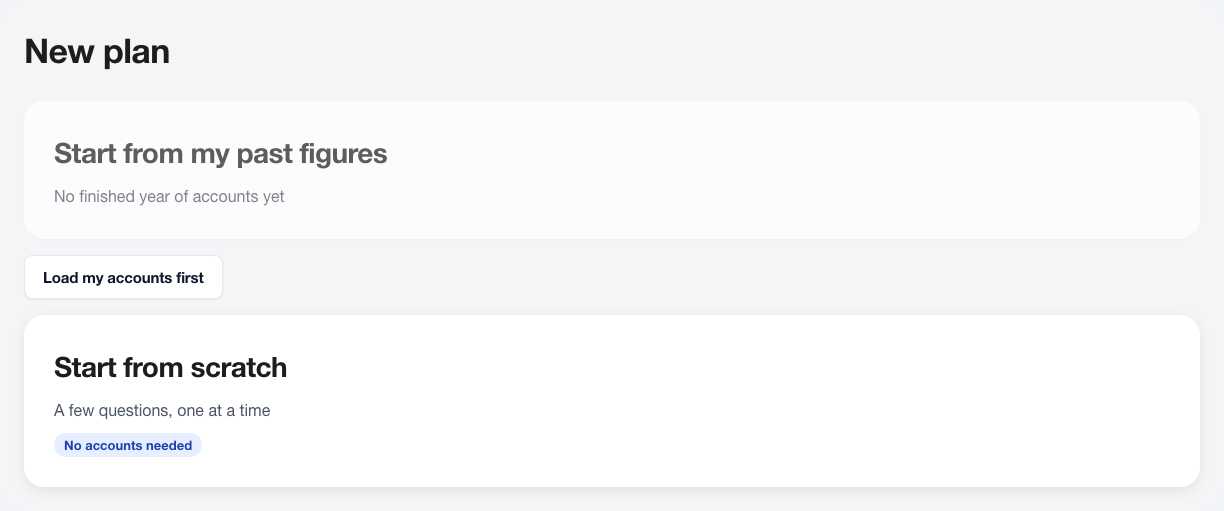
A plan in minutes. With accounts or without.

From your accounts · about 15 minutes

Last year's figures, month by month.

Drop in a MYOB or Xero profit and loss, or a CSV. Pick the year to start from. One-offs are left out for you.

From scratch · about 10 minutes

No accounts? Eight short questions.

What you run, what you sell and when, the main costs, lease, loans and wages. The bank, month by month.

New plan: start from your past figures, or from scratch
The result

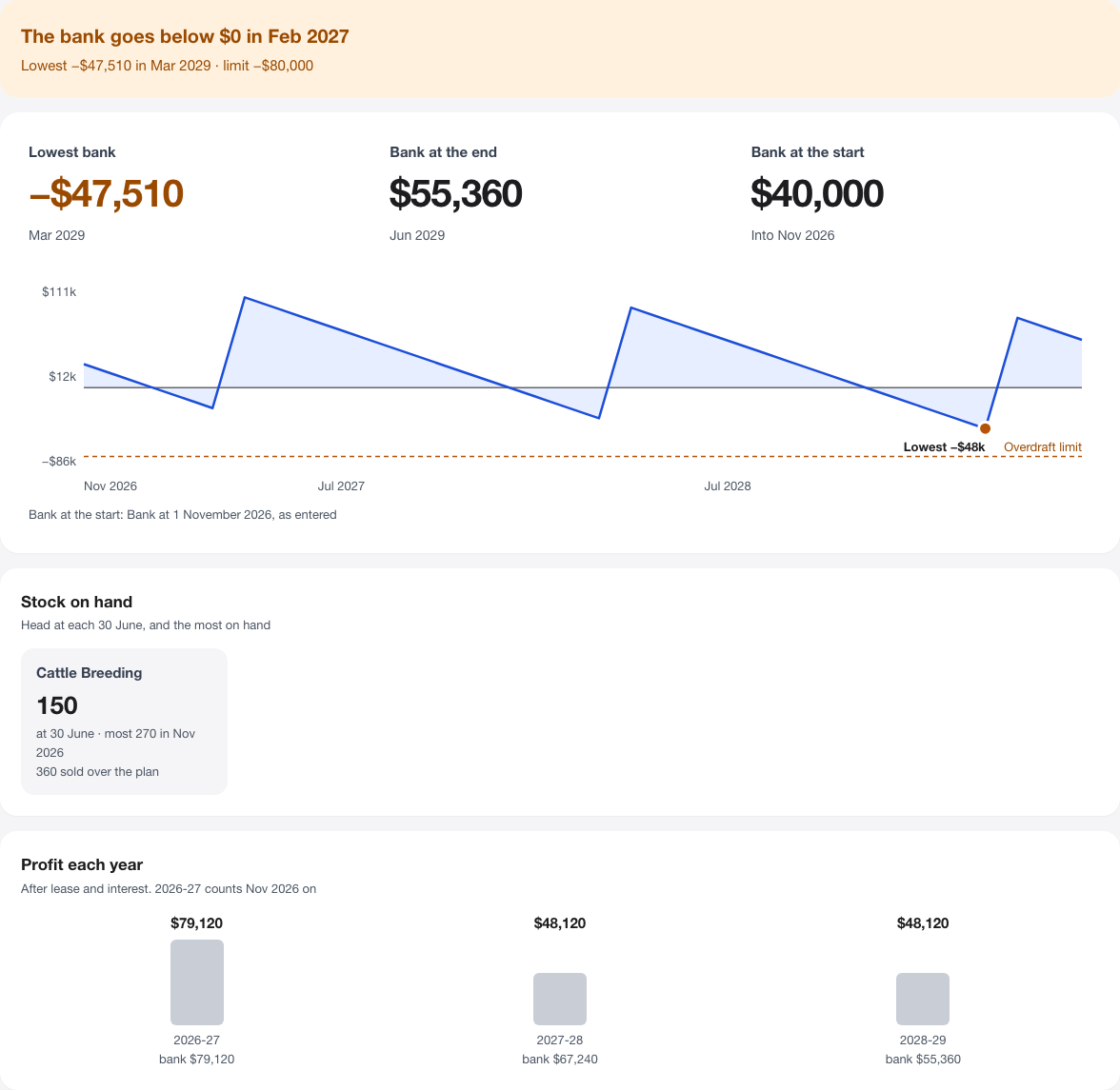
The lowest bank, and when.

Profit each year, the bank each month, and a plain warning before it goes below zero or past the overdraft.

The bank month by month for a plan built from scratch
What it does today

Your whole farm as one connected plan.

Every enterprise is a profit centre. They roll up to your whole-farm profit and your running bank balance — all from the accounts you already keep.

AI advisor

An advisor that reads your plan.

Ask in plain English. The advisor sees your forward plan's cashflow and your farm's state, industry and benchmark region, then pressure-tests it — where's the cashflow risk, is the plan realistic, what would a dry spring do. Decision support to take to your accountant, not generic advice.

  • Grounded in your actual numbers
  • Knows your state, industry and region
The AI advisor answering a plain-English question about your forward plan
Is my plan realistic, and where's the risk?
Your plan leans on agistment carrying overheads. Cash gets tight in December (-$41k) before the autumn cattle sale lands. I'd pressure-test the breeding gross margin and line up the overdraft for spring.
Who's behind it

Andrew Freshwater

Founder · working cattle & sheep producer

I run cattle and sheep in north-east Victoria, and I built TheFarmOS because I wanted to actually see where the money goes — enterprise by enterprise, month by month.

Forward plan

Every account, by enterprise, month by month.

Import your MYOB/Xero export and your plan seeds from your real history — fully editable. See each enterprise's gross margin, then overheads, financing and drawings flow down to your operating profit and your bank balance.

  • Account-level detail per enterprise
  • Profit lens and Cash lens on the same numbers
  • Breeding herd-flow planner built in
The Forward Plan showing accounts by enterprise, month by month
AccountQ1Q2Q3Total
Cattle sales—52k78k130k
Agistment income34k28k32k94k
Animal health-6k-5k-7k-18k
Freight-3k-4k-6k-13k
Gross margin+193k
On track? · the bank month by month

See the month you get tight — before it happens.

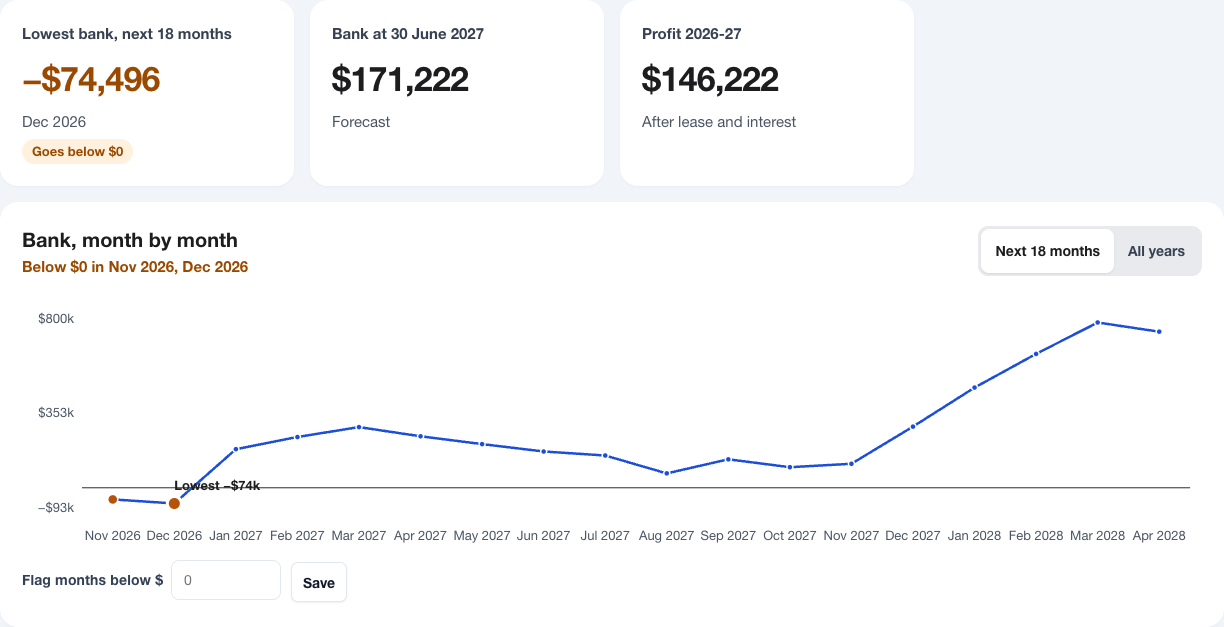
Your plan opens on three figures: the lowest bank in the next 18 months, the bank at 30 June and this year's profit. As your accounts come in, On track? puts them beside the budget, only for the months the budget covers, and names the five biggest gaps in plain words, each marked as timing or a real change.

  • Every account by name, the biggest gaps first
  • The bank month by month, the lowest month and any month under your buffer flagged
  • Type a year's figure in the budget; the bank follows, and Undo puts it back
Plan: the lowest bank in the next 18 months, the bank at 30 June, profit this year, and the bank month by month with the months below $0 flagged (a made-up farm)
Running bank balance
Dec · -$41k
RationOS + season signal

Build rations against the season you're actually in.

In beta. Set up each animal group and its ration — pasture, supplements, feedlot — with energy and protein checks. Enter your town and TheFarmOS pulls your local rainfall and temperature to read it as a pasture-growth signal that anchors the ration.

  • Energy + protein met / short, per group
  • Live local rainfall → pasture-growth signal
  • Cost per head per day for each group
Rain · 30 days
72mm
vs normal
112%
Pasture
Growing

Warm and wet enough for strong growth — good green feed likely. Typical pasture now ~11 MJ ME/kg, 22% protein.

Grazing platform

Run the grazing side, paddock to P&L.

Our top tier — Grazing — adds a full grazing platform. Track every mob and paddock across multiple farms, with DSE stocking rates, a weekly feed budget for each paddock that warns before you run short, and the reproduction calendar from joining through scanning, lambing and weaning. Its gross margin by livestock enterprise and monthly net position come from your MYOB accounts. Xero files feed TheFarmOS's own Enterprises screen every night (beta), but not the grazing platform yet. Your manager or agronomist gets their own view-only or editing access.

  • Multi-farm mobs, paddocks & DSE stocking rates
  • Weekly feed budget per paddock with cover-breach alerts
  • Reproduction calendar — joining → scanning → lambing → weaning
  • 20-year rainfall, deciles & growing-season tracking
  • Gross margin by livestock enterprise + monthly net position (MYOB)
  • Share with your accountant, banker or adviser: you tick what each one sees · CSV import / export
Grazing overview
Stocking
1,240 DSE
Feed budget
+3.2t /wk
Rainfall
decile 7
Sheep breeding GM
$182k
Benchmarking

Where the business sits, this year.

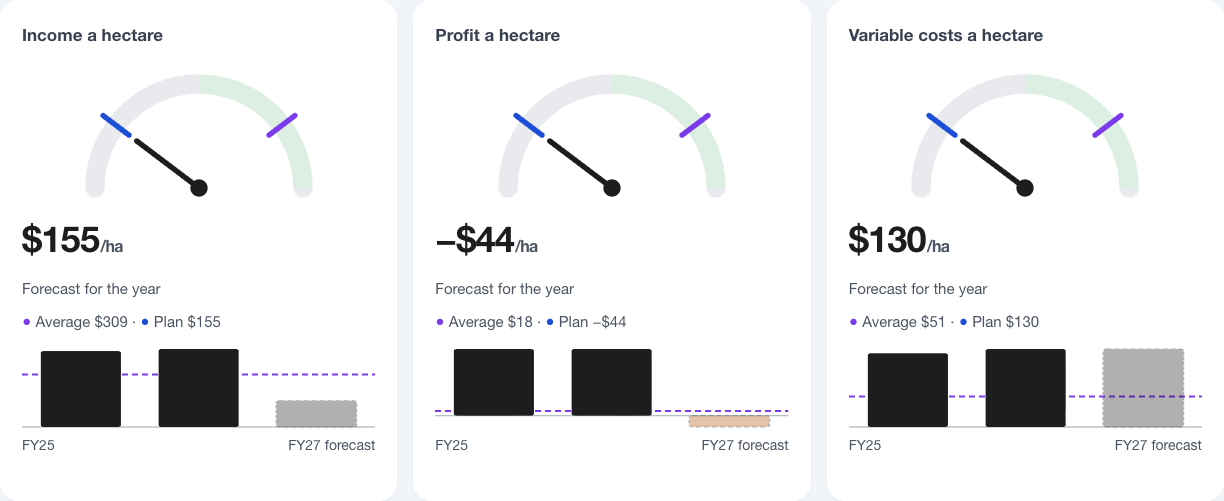
A full-year forecast, updated each time you load the month's actuals: income, profit, costs and return on assets per hectare, and each enterprise. Each measure on a dial (right is always better), with every year beneath it. Against your plan and farms in your region, or across your state where your region has no like-for-like figure. On every plan.

  • Whole-farm P&L and balance sheet for any year in your ledger; every year side by side on Professional; enterprise analysis on Grazing
  • Victoria: Agriculture Victoria's Livestock Farm Monitor Project, regional averages for Gippsland, Northern Victoria and South West, 2025–26. Elsewhere: ABARES farm survey figures for your ABARES region, or your state's beef, sheep or mixed farms where your region is mostly cropping or has too few sample farms; latest 2024–25. Average only: no top 20% is published for these
  • Ahead, level or behind, measure by measure. A figure you haven't entered shows a dash, never zero; estimated stock numbers are marked ≈
  • A KPI dashboard driven by the same engine, plus spreadsheet import / export
Home: each measure on a dial against the regional average and the plan, with every year beneath (made-up figures)
An example · made-up figures
Net profit /haahead of the region
$351 · region avg $290
Return on assetsbehind the region
3.2% · avg 4.1%
Cost of production /DSEneeds stock numbers
— enter DSE to unlock
Also live

The rest of the business, in one place.

Edit the plan on screen

Any line, any month or year. Every change keeps a version; undo puts it back.

Asset register

Plant and equipment, values at each 30 June, sales and what needs attention.

Debt and the lender pack

Debt, equity, cover ratios and price stress tests, with loan balances from your 30 June balance sheet: the pack your bank asks for (Grazing). In a loss year it shows the dollars short, never a negative ratio.

Check my figures

One tap tests every part of your data: missing months, unsorted accounts, hectares, labour, stock that doesn’t add up, a bill entered twice (on Home as soon as the books load) and balances that haven’t moved in a year. Each answer opens the screen that fixes it.

Your rain since 1900

Daily rain for your location, this season and this year ranked against every year since 1900, with your own gauge beside it.

A tour of every screen

Step by step, on your own figures. Close it any time; it carries on where you left off.

Help in plain English

Getting started step by step, every figure explained with where it comes from, and how to read each report. A short video for every screen, with its words beside it. Every plan.

Every report, to PDF and Excel

Profit and loss, balance sheet, cash flow, budget against actual, gross margins, cost of production, the lender pack, livestock, pasture, paddocks and crops: 51 in one list, each marked with its plan.

Your bank, month by month

The next 18 months on your plan, with any month the bank goes below $0 named. Arrange Home so what matters to you comes first.

What do I need?

The stocking rate that pays the rent, or reaches the return you want; the margin a DSE you need; what a stocking rate earns. Worked backwards from your own figures, with the sum shown, then checked against your feed budget.

Your own targets

Set the return, profit ratio, cost ratios and stocking rate you aim for, on your basis. Every year of your plan is shown against them, and Home marks them.

Test a decision

Buy or lease land, change stock numbers, prices or costs, start an enterprise or take a loan: five years of profit, cash and net worth beside your plan (Professional).

Livestock and pasture

Head by class, month by month, for cattle, sheep, feedlot and mixed farms, on every plan. Your stock against the pasture your location grows, with no paddock map needed (Professional).

Paddocks on a map

Draw paddocks on aerial or satellite imagery, or import them from KML, KMZ, shapefile or GeoJSON. Each one measured, linked to what runs on it, with its own profit a hectare from its crops and grazing days, or the enterprise average, marked as such, where nothing is recorded (Grazing).

Crops

Each crop on its paddock: yield, price and costs, plan against actual, beside ABARES for your region. Contracts, unsold grain and the cash still to come. Every plan.

Market prices, kept up to date

MLA's indicators, from the Eastern Young Cattle Indicator to the trade lamb indicator, load every month without you doing anything. Price years, results at average prices and the range of outcomes always use the latest.

Share with your adviser

Your accountant, banker, adviser or business partner, on any plan, to see or to edit. Every change they make is listed for you; stop sharing at any time.
In development

On the roadmap.

Being built next — honest about what's not here yet. These aren't live today.

Banker-ready PDF reports

Reports already print to PDF from your browser. A formally formatted version for your bank manager and accountant is on the way.

MYOB live connection

Actuals read from MYOB every night, instead of a monthly export. Built; waiting on MYOB to approve TheFarmOS.

Pricing

Simple plans. Try everything free for 14 days.

Sign up with just your email: no card. For 14 days you get every feature, Grazing included. We email you 3 days before the trial ends and on the day. Pick a plan whenever you're ready: it's charged straight away, then monthly, cancel anytime. All prices in AUD and include GST.

Starter

Solo property

$10/mo
AUD incl. GST
14-day free trial, no card
  • One farm business
  • Forward plan from your accounts or from scratch
  • Edit on screen, versions and undo
  • Asset register
  • Budget vs Actual, monthly
  • Running cashflow
  • Benchmarking against farms in your region
  • RationOS + season signal (beta)
  • MYOB / Xero / CSV import
  • Check my figures and a tour of every screen
  • Your rain since 1900, ranked in deciles
  • Report library: balance sheet, cash flow and more, to PDF and Excel
  • Your bank month by month, short months named
  • Share with your accountant, banker or adviser
  • Head by class, month by month
  • Crops: gross margin a hectare and paddock, contracts and unsold grain
  • Help: getting started, every figure and report explained
Start 14-day free trial Subscribe now: $10, charged today
Most chosen
Professional

Full platform + AI advisor

$50/mo
AUD incl. GST
14-day free trial, no card
  • Everything in Starter
  • AI advisor on your plan
  • The advisor helps sort your accounts
  • Scenario modelling
  • Every year side by side, through the price cycle
  • Test a decision over five years: land, stock, prices, loans
  • Feed budget: your stock against your pasture, no paddock map needed
  • Priority support
Start 14-day free trial Subscribe now: $50, charged today
Grazing

Grazing platform + scale

$65/mo
AUD incl. GST
14-day free trial, no card
  • Everything in Professional
  • Full grazing platform — multi-farm mobs & paddocks
  • Lender pack and the reconciliation to your accounts
  • Livestock a head, a DSE and a hectare, with the costs behind
  • Paddock map: draw or import paddocks, profit by paddock from what each grows and carries
  • Mixed farms: crops and livestock share overheads by hectares
  • Reproduction calendar & 20-year rainfall analysis
  • Enterprise analysis: gross margin, cost of production, overheads
  • Bank ratios, each with its formula and source
  • Dedicated onboarding: we ring you to set it up
Start 14-day free trial Subscribe now: $65, charged today

Bigger operation or an advisor group? Get in touch →

Questions

Frequently asked.

What does TheFarmOS actually do?+
It builds your forward cashflow, month by month: from your MYOB, Xero or CSV accounts, or from scratch with no accounts at all. Then it shows where the business and each enterprise sits this year, as a full-year forecast updated each month: against your plan, last year and farms in your region, or across your state where your region has no like-for-like figure, on every plan. Plus a ration builder (beta), and an AI advisor that reads your plan on Professional and Grazing.
How does the AI advisor work?+
On the Professional and Grazing plans, ask a question in plain English. Your plan's cashflow figures and your farm's state, industry and benchmark region go to Anthropic's Claude models as context, and it answers using them. It's decision support to review with your accountant or bank manager, not financial advice, and not a replacement for them.
Is my data private?+
Yes. Your data is tied to your account and protected by row-level security, so no other user can see it, unless you share it. When you share your farm, you tick exactly what each person sees (Home, the plan, cash and bank, the lender pack, debts, reports, crops, livestock, assets, the books, Set up), and whether they can change anything; the database itself enforces it. We don't sell it, aggregate it with other farms, or share it with banks or agents. To close your account and delete your data, use Set up → Your account → Delete account (it's immediate), or email farmos@clearcreek.com.au and we remove it within 30 days. Download my data, on the same card, gives you everything as a file first.
How long does setup take?+
From your accounts: about 15 minutes. Export last year's profit and loss from MYOB or Xero (or a CSV), drop it in, check the accounts, and build the plan. From scratch: about 10 minutes, answering eight short questions. Actuals are kept up to date by loading one MYOB or Xero export a month. Xero can also be connected from the first screen and is then read every night (beta).
Which regions are benchmarked?+
Victoria: Agriculture Victoria's Livestock Farm Monitor Project, the regional averages for Gippsland, Northern Victoria and South West Victoria printed in its 2025–26 annual report. Everywhere else: ABARES farm survey figures for your ABARES region (all broadacre farms; latest year 2024–25), matched from your postcode. Where your region is mostly cropping and you run livestock, or ABARES has too few sample farms there, you are compared with your state's beef, sheep, sheep-beef or mixed farms instead, and the screen says it is the whole state. These sources publish averages only, so no top 20% is shown. Where a figure isn't published on the same basis as yours, you see your plan and last year instead, and it says so.
Is it built for Australian farmers?+
Yes — built by a working cattle and sheep producer in north-east Victoria. Australian financial year and GST, enterprise structures that match how mixed farms actually run, and local weather for the season signal.
What stage is TheFarmOS at?+
Live today: a plan from your accounts or from scratch, edited on screen with versions and undo; budget vs actual; the running cashflow; live benchmarking; the asset register; debt and the lender pack; banker and accountant reports; RationOS; and the AI advisor. Not live yet: a direct MYOB connection (built, waiting on MYOB's approval) and a formally formatted bank report. Actuals come from one export a month, or from Xero every night (beta). Market prices, MLA's indicators, load automatically every month.
Can I cancel anytime?+
Yes. The 14-day free trial needs no card, so there is nothing to cancel: if you don't pick a plan, your account closes when the trial ends and your farm's data is kept for 12 months. A plan is charged straight away, then monthly. Cancel anytime from Manage subscription in the app's account menu, and you keep access to the end of the month you've paid for.

Stop guessing where the cash goes.

Import your accounts, build your plan, and see the year ahead — by tonight.

Start your 14-day free trial →
Farm OS Assistant
G'day! I can see what page you're on. Ask me anything about your financials, features, or how something works.
Powered by The Farm OS